

The PM’s Guide to Managing AI Debt
The hidden cost of shipping AI fast, and how to control it.

AI debt is more than technical debt. It’s options debt: losing your ability to respond when AI systems break in production. This is Part I of a series that describes the tools PMs and AI product owners can use for managing AI debt.
By the end, you’ll know how to:
Identify which kind of AI debt you’re carrying,
Recognize when scaling becomes risky,
Take the right steps without hurting customer trust, cost, or privacy

Five days before the holiday promo, the Slack messages start piling up.
“The assistant keeps quoting the old return policy.”
“Customers stuck in loops asking for a human.”
“Order numbers showing up in logs again.”
Maya stares at her screen, coffee growing cold. She’s two quarters into owning the Intelligent Virtual Agent for a mid-sized ecommerce company. Last week’s “quick fix” has already increased wrong-answer complaints by 28%, and the Friday-through-Sunday window will bring three times the normal conversation volume. VIP cancellations spike when customers get bad answers, and finance is monitoring conversation costs closely.
Maya is in debt. Not the well-behaved kind of debt you calculate on a spreadsheet, but the unruly kind that kicks in your door when you least expect and demands payment.
Every product manager knows about technical debt: choosing a short-term solution in the present costs you in the future. But technical debt is usually well-behaved: you can estimate refactoring work, schedule sprints, and budget the engineering time. It’s like a mortgage: a known principal, manageable interest, and a clear path to pay off.
AI debt is different. AI debt is like borrowing from a loan shark. The interest rate is variable and often hidden. Miss one payment (a policy update you didn’t version, a drift you didn’t catch, a prompt chain nobody owns) and your model hallucinates, your assistant quotes a retired policy, your resolution rates tank in production, and customers start leaving.

Worse yet: because AI systems are probabilistic, opaque, and context-dependent, the cause rarely maps cleanly to the effect. Maya’s problem isn’t that her assistant is broken. It’s that her team can’t see what’s breaking, and can’t safely test fixes without risking more customer trust. As a result, Maya’s options are quickly disappearing.
Maya’s case illustrates three things.
First, AI debt is options debt. Every decision you make with an AI system either removes or preserves your ability to respond when things go wrong. And with AI, things go wrong faster and more mysteriously than with traditional software1.
Second, Maya’s case illustrates what I’ll call The Options Principle: the PM who manages options well usually outperforms the PM who manages models well, in most real conditions.
Third, Maya’s case illustrates how PMs can manage options well. It’s this third point I’m going to focus on. The previous quarter, Maya had the foresight to build some tools to get herself out of AI debt: three gauges to measure the debt and three levers to pull if things go wrong. Those gauges and levers are what let her climb out of debt in 72 hours instead of flailing for a week.
The Control Room
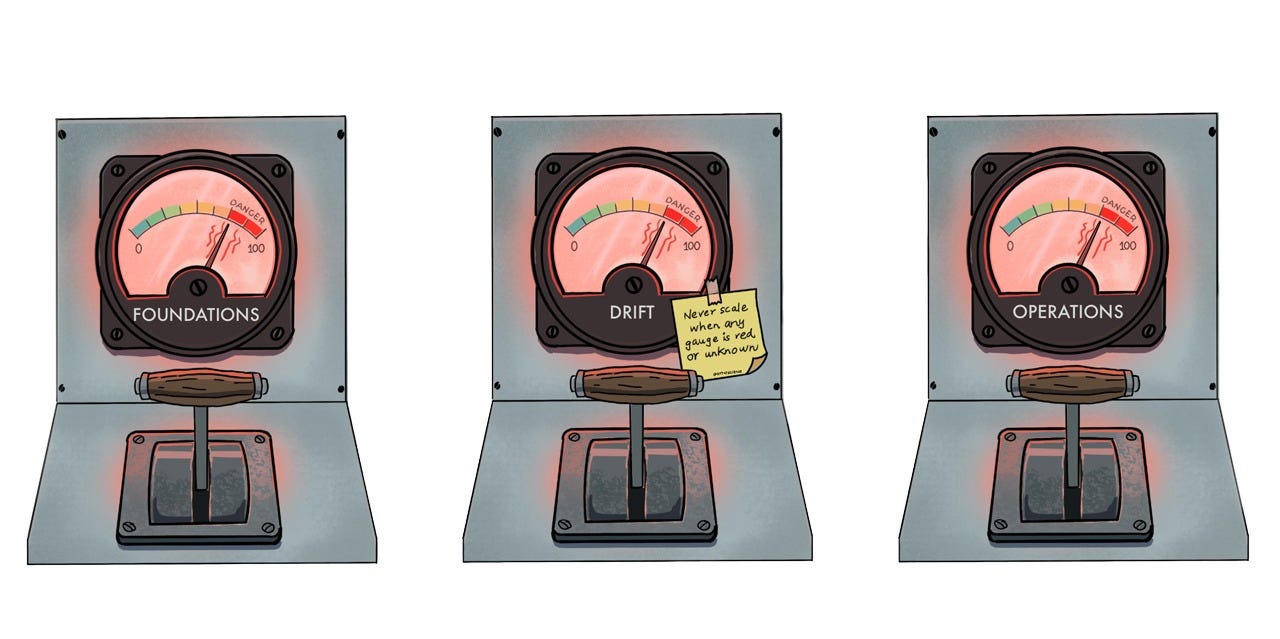
To understand Maya’s tools, picture a control room. In front of you are three gauges, each measuring a different kind of AI debt: foundation debt, drift debt, and operations debt. Each debt gauge has green, yellow, and red zones. Green means you have options: you can experiment, scale, and recover from mistakes. Yellow means you’re starting to lose flexibility. Red means you’re flying blind, and any move could make things worse.
Next to each gauge is a lever which you pull when a gauge goes red. Pulling the lever doesn’t fix the problem. It just buys you time and information so you can fix it without burning customer trust.
Governing everything is one rule written on a sticky note:
Never scale when any gauge is red or unknown.
Let’s walk through the gauges and the levers.
Gauge One: Foundation Debt
Foundation debt is about traceability: when something goes wrong, can you find out what happened? If, say, a customer complains about a wrong answer, can you pull up the conversation, see which version of the policy the assistant was quoting, and re-run it to understand why? If you can’t, you’re fixing blind.
Foundation debt isn’t the same as drift. Drift happens when the outside world changes while the model stays the same: people start asking new things, in new words, about situations the model was never trained to handle. Foundation debt happens when the scaffolding around the model changes while the model stays the same: policy versions, retrieval indices, prompt chains, or other bits of scaffolding no longer align with what’s true. Maya’s return-policy bug is an example of foundation debt: what changed wasn’t the world, but the index behind the assistant.
Gauge One measures two things: the likelihood you can reproduce yesterday’s behavior, and the likelihood that answers cite current policy. Where you draw the lines that separate green from yellow, and yellow from red will vary on a case-by-case basis. Here’s how Maya drew the lines:
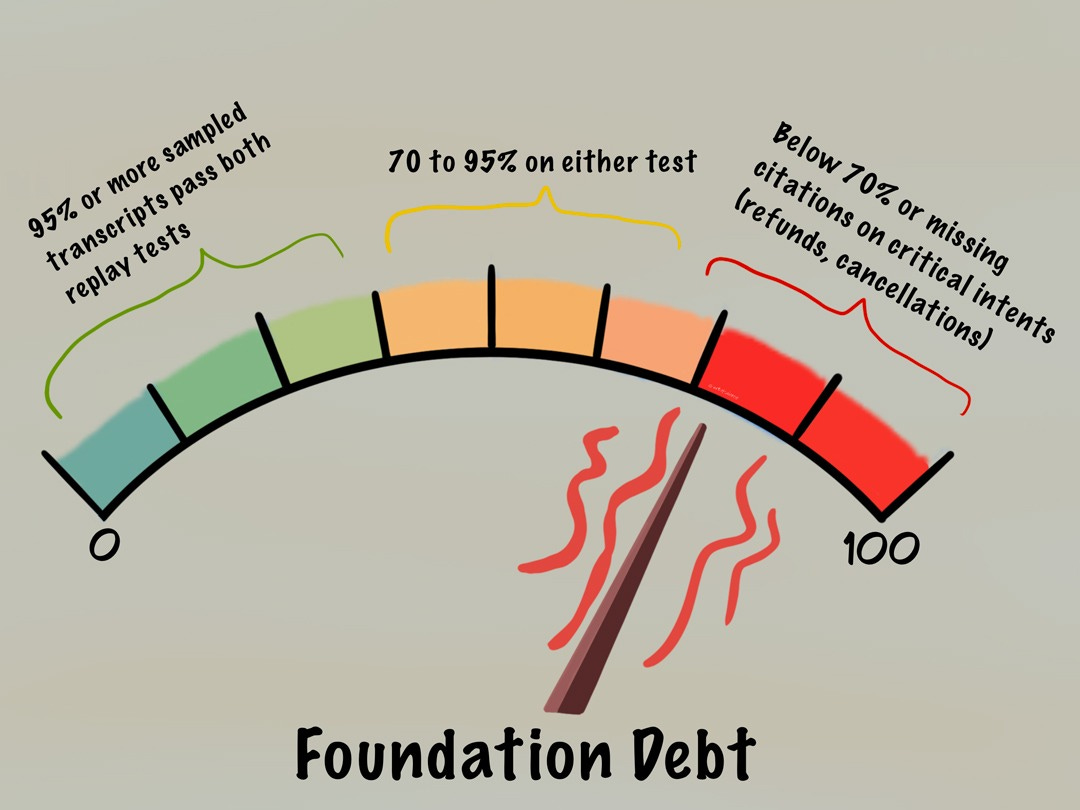
Behind these divisions are two kinds of replay.
The first is forensic replay: being able to re-run an old conversation exactly as it happened (same policy, same data, same settings) and get back the same answer the assistant gave at the time. That tells you what happened and why.
The second is regression replay: running today’s assistant against yesterday’s hardest cases to confirm old bugs haven’t crept back in. Language models are never perfectly repeatable, so you’re not hunting for word-for-word matches. You’re checking that the decisions it makes, and the sources it cites, come out the same.
In Maya’s case, the return policy had changed the week before, but the assistant kept quoting the old policy. When a customer complained, no one could reconstruct what the assistant had said because the transcripts weren’t tied to a policy version. Maya couldn’t prove there was a bug, let alone fix it.
Gauge Two: Drift Debt
Drift debt happens when the world your model lives in changes, but the model stays the same. A new promo or season changes the intent mix, the spread of what people are asking for: more cancellations this week, more address changes, a flood of gift-receipt questions in December. Your dashboard still says the model is accurate because its score is measured against a frozen sample of conversations from three months ago. That old sample never included the new questions. So the number stays green while the real signs turn red: chats run longer, more people ask for a human, and fewer leave with their problem solved. The model says it’s doing fine. Your customers disagree.
Gauge Two measures whether your customers are getting less happy while your dashboard still looks fine. Again, where you draw the lines that separate green from yellow, and yellow from red will vary on a case-by-case basis. Here’s how Maya drew the lines:
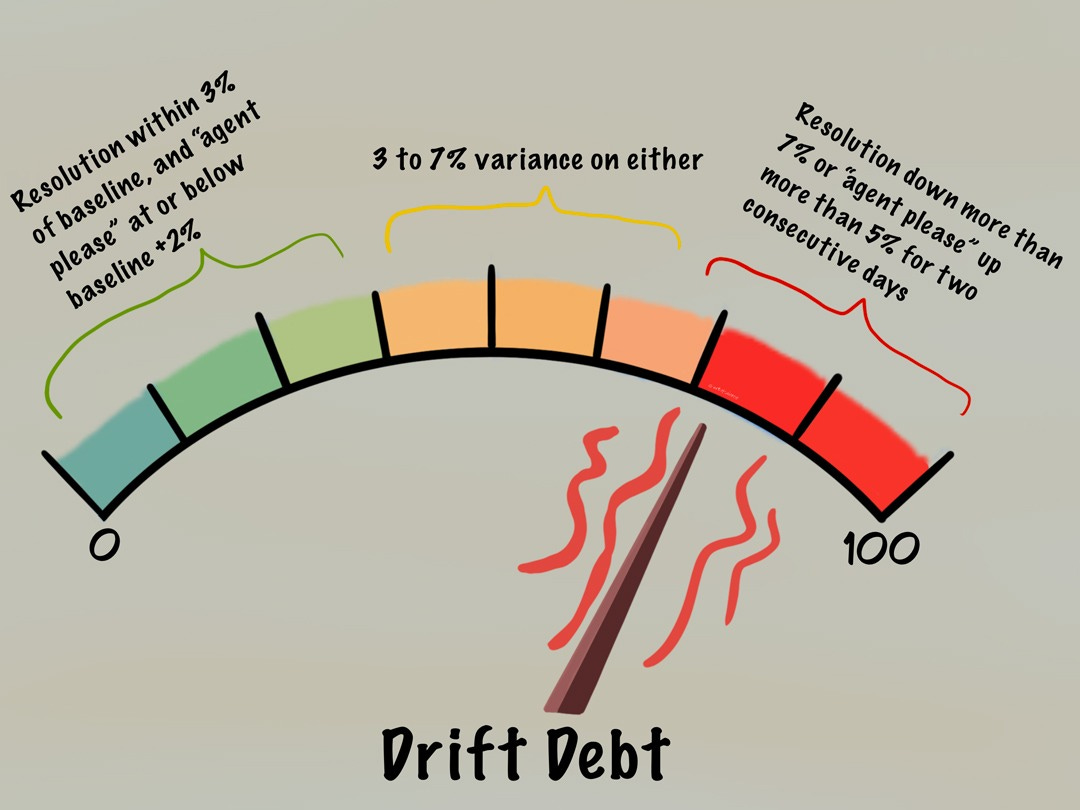
Let’s look at the 7% red line. Below it, ordinary week-to-week noise can hide a real decline; above it, something is genuinely wrong. It isn’t a fixed number: set it against how noisy your own traffic is, and how much a wrong answer costs on that particular question. Getting a refund wrong matters more than getting store hours wrong.
Maya’s classifier had been trained on tickets from the summer, a time when almost nobody asks about gift receipts. Fast forward to December. A customer asks, “Can I add a gift receipt to this order?” and the model wrongly files the question under returns. That’s an easy slip for the model to make: both cases involve a receipt and an order, and both sit in the same help section of the catalog. But the cases demand different answers, and the assistant gives the wrong answer with complete confidence.
A confident wrong answer is worse than waffling because the customer will believe it and act on it.
Gauge Three: Operations Debt
Operations debt is about unglamorous things like speed, cost, privacy, and ownership: replies get slower at peak hours, the cost per conversation creeps up, personal data like customer addresses and order numbers start turning up where they shouldn’t. Somewhere in the system sits a tangle of prompts that nobody fully understands, written by someone who left six months ago, holding three services together with default settings that no one remembers choosing.
Gauge Three measures whether replies are fast, costs bounded, logs clean, and every piece of the system owned by someone. Here’s how Maya drew the lines on her Operations debt gauge:
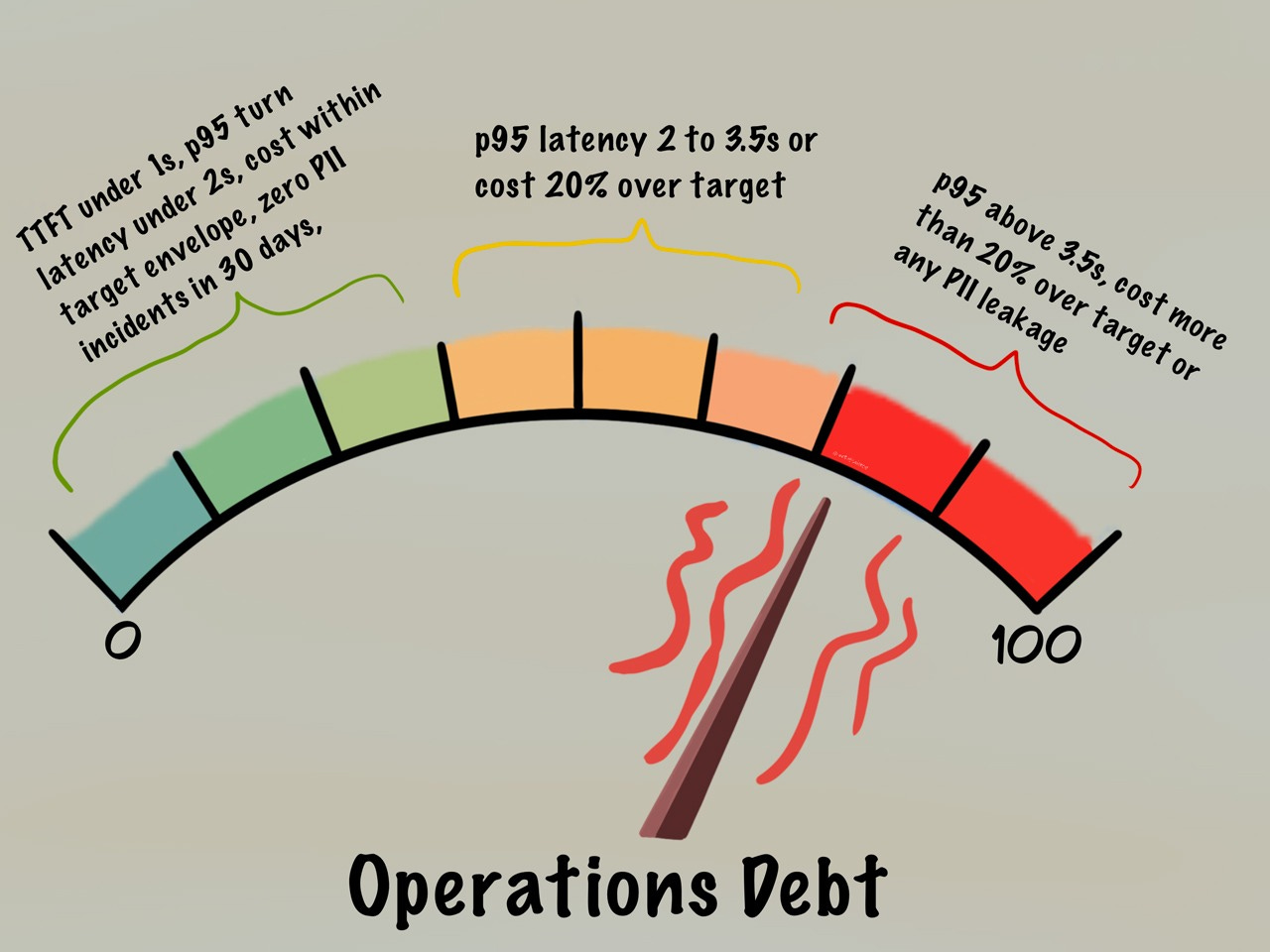
Green means the first words appear fast, the time-to-first-token (TTFT) stays under a second, the entire reply finishes within a couple of seconds, the cost per chat matches what you budgeted, no personal data (PII) has leaked in the past month, and every prompt and adapter has a named owner. Red means replies have slowed past about three and a half seconds, costs have run more than 20% over budget, or some personal data has leaked. (Three and a half seconds is roughly when people start giving up on a chat; although in harder cases, like legal or medical contexts, people have a little more patience.)
In Maya’s case, replies slowed to four seconds when Black Friday hit, so customers started giving up mid-conversation. Worse yet, a privacy check found customer addresses sitting in the logs, and her team couldn’t fix it quickly because the logic was scattered across three services with no single owner.
The stakes are real. IBM’s 2025 Cost of a Data Breach Report puts the average breach at $4.44 million [2], with unsanctioned “shadow” AI adding about $670,000 on top, and 97% of the firms hit by an AI-related incident had no proper access controls in place [3].
Air Canada learned the lesson the hard way: in court. In 2024 it was held liable when its chatbot gave a grieving customer the wrong bereavement-fare policy. The tribunal rejected the airline’s argument that the bot was somehow separate from the company [4].
Maya’s problem is similar: a customer-facing assistant confidently stating something that isn’t the company’s policy.
Klarna makes the point from the other direction. In 2024 it boasted that its AI did the work of 700 agents. By 2025 it was hiring people back: cutting costs had cut service quality with it [5]. Scale fast without instruments that let you see what’s breaking, and the speed itself becomes the thing that hurts you.
There are three more things to say about the gauges and the kinds of debt they measure before we turn to the levers.
First, the debts feed into each other. A weak foundation blinds your drift gauge: if you can’t tell which policy the assistant quoted, you can’t see whether its behavior has drifted. And when you can’t see drift, it quickly becomes an operations crisis: scaling a broken model and watching resolution rates collapse at the worst possible moment.
Second, when it comes to paying down the debts, there’s no perfect order in which to do it. Generally, in a live incident, you handle the sharpest risk first: anything touching privacy, latency, or direct harm to customers. The deeper foundation work pays off more slowly.
Third, there’s a single rule you must follow:
Never scale when any gauge is red or unknown.
Scale on a red gauge and you give up your chance to recover cleanly. Scale on a gauge you can’t see and you give up your chance to learn what went wrong.
Keep in mind that when you’re dealing with AI debt you can’t eliminate uncertainty completely. Your job is instead to reduce it as much as possible with small, measured trials. Run whatever change you’re making on a slice of traffic for 1-2 weeks on at least 500 conversations per version. That’s enough to catch the obvious problems. But to prove a small win, you’ll need more. To trust a 5 to 10% change in your resolution rate, you’ll want a thousand or more conversations per version and a couple of weeks.
Decide up front what you’re watching (resolution rate, how often people ask for a human, cost per chat) and decide what result would make you stop early. Log every answer with enough detail to reconstruct it later: which policy version it used, which model, the outcome, the speed, the cost. If you skip that logging you don’t have a real trial but only a hunch.
With these points in mind, let’s talk about the levers to pull when one of your gauges goes yellow or red.
Lever One: Shadow and Refresh
Pull Lever One when the drift gauge is yellow or red. Here’s an example of how it works:
The Monday before promo week, Maya’s data lead messages her a screenshot and a grin. The new intent classifier is scoring 94% accuracy in testing. The recommendation: ship it to all traffic before Wednesday, so the assistant can route the holiday rush correctly.
It’s tempting. The accuracy looks great, the deadline is real, and a quick yes will clear Maya’s afternoon. But Maya says no.
Rather than shipping, Maya puts the new model in shadow mode. She sends a copy of one in ten real conversations to the new model, while the customer keeps talking to the old, trusted model.
The new model never replies to a real customer. It just sees the same question and records what it would have done: the route it would have picked, which policy it would have cited, which other systems it would have called (its tool calls). You get to watch the new model handle real traffic without a single customer feeling it.
Shadow mode catches what offline testing missed. On live December traffic, the new model kept mishandling gift-receipt questions for the reason described earlier: it had been trained on summer tickets when almost no one was asking about gift receipts. Maya’s team spotted the problem, retrained the model on recent conversations, ran it in shadow for another day, and only then let it start replying to customers. When it did go live, the resolution rate rose seven points and escalations held flat.
That’s Shadow and Refresh in practice: running the new model in the background, watching what it gets wrong, fixing it, and widening its reach only when the shadow runs turn dull, that is, when the new model and the old one mostly agree and nothing surprising turns up.
It might seem counterintuitive to say no to a model that scores 94% accurate.
But a 94% model you can’t replay or roll back is worth less than an 88% model you can.
The six-point accuracy gap closes in a week once you’ve instrumented things. By contrast, the trust you lose from one bad rollout takes a quarter to win back.
One limitation of Shadow and Refresh: shadow mode shows you what the new model would do, but not how customers feel about it because none of them ever see it. To learn that, you eventually have to let real people use it in a carefully staged rollout with a stop rule set in advance: if requests for a human jump more than 5%, you pull it.
Shadow mode earns you the right to run that rollout. It doesn’t replace it.
Lever Two: Version and Replay
Pull Lever Two when the foundation gauge is yellow or red. Here’s an example of how it works:
A bug report comes in on the Tuesday after Thanksgiving. A customer has screenshotted two different answers from the assistant, fifteen minutes apart. One says, “30 days from purchase,” the other, “January 15th for holiday orders.” Same customer, same order. The screenshot is already in the VP’s inbox.
Maya pulls up the conversation. Every answer carries a tag pointing to the policy it had used, so she can trace each one. She re-runs the first answer and sees it quoted the October version of the policy, before the holiday extension. The second answer quoted the November version, after the update. So why two answers to the same person?
The assistant looks up policy text from a search index. That index wasn’t rebuilt after the policy changed, so some questions were still being matched against a saved copy of the old document. It takes twenty minutes to find the cause, and another hour to ship the fix.
The setup that buys Maya her twenty-minute fix isn’t something her team engineered on the spot. A month earlier, the same bug would’ve taken days to find. What bought Maya the twenty-minute fix was the machinery behind Lever Two, something she’d pushed for months earlier: give every version of a policy a unique stamp, tag every answer with the policy it used, and freeze the policy, the search index, and the prompts together so that any past conversation can be replayed exactly as it ran.
Corrections from human agents, the human-agent overrides, go into a reviewed queue, and only become training data once two people agree and a test confirms they don’t break other cases. New changes ship to 5 to 10% of traffic behind a flag first.
The tempting shortcut in these cases is to edit the prompts, nudge the search weights, and retrain, without versioning any of it. That’s faster, and it seems better right up till the moment the contradictory answers appear on social media and no one can say which policy the assistant had used, or how to undo it.
The ability to trace and reverse is exactly the option you throw away when you skip the versioning.
Lever Three: Guardrail and Stabilize
Pull Lever Three when the operations gauge is yellow or red. Here’s an example of how it works:
Black Friday, 11:07am: the alert fires. Response times have crossed three and a half seconds for the slowest stretch of conversations. The dashboard shows the spike starting at 10:58am when the doorbuster email hit inboxes.
Maya watches the guardrails installed by her team do their job. Conversations that hit the latency threshold get handed off to human agents automatically with a clean message: “Let me connect you with a specialist who can help faster.” No errors. No hang. Customers never know the assistant is struggling. By 11:23am, infra has spun up additional capacity. By 11:41am, latency is back under 2 seconds. And by noon, the team has expanded from 15% to 40% coverage. The debrief takes twenty minutes: 847 conversations affected, 831 handed off cleanly, 16 customers who gave up before the handoff, and zero complaints about the assistant during the spike.
The thirty minutes between the alert and the recovery were the whole game. Maya and her team won them before the game even started, back when they installed the guardrails.
If a reply got too slow, the conversation was handed off to a human. No conversation could run past a dozen turns. Calls out to other systems were rate-limited. Personal data was stripped or masked before anything reached the logs.
Every prompt had an on-call owner with a runbook and a rollback switch. And the cost per conversation was capped at a figure they’d worked out from what a customer is actually worth to the business, not from some industry average.
The tempting shortcut they rejected: push to half of all traffic, wave off the latency warnings, leave the orphaned prompts alone, clean up the logs later. That’s the path where the post-mortem finds customer addresses sitting in logs, where the privacy team freezes every experiment for six weeks, and where a hidden retry loop in those unowned prompts runs up the bill each time the model slows down. The learning stops. The trust burns. The guardrails never get built.
Control Room on a Budget
What I’ve said about the levers assumes you have the infrastructure to run shadows, build replay tools, and wire in guardrails. Plenty of teams don’t, at least not yet. Here is how to get most of the same protection on a shoestring.
Worried about privacy when you copy live traffic? You should be, because shadowing means duplicating real customer data. The clean way around it: for questions that carry no personal data anyway, like product or policy lookups, copy the conversation to the new model with any identifying details, names, and order numbers, stripped out first.
For the ones that do carry personal data, build a set of realistic fake cases instead. You might lose a bit of realism, but you skip the compliance headache.
Not enough traffic to measure? The 500-conversation floor assumes a busy line. If you only handle a thousand conversations a month, a 10% shadow gets you a hundred in a month, too few to be sure of much.
So stretch the trial longer (four to six weeks instead of two), accept a lower bar of confidence, or just watch which way things are moving rather than chasing a precise number. A trial that tells you, “this is probably better,” still beats flying blind.
Seasonal traffic will fool you. A model that shines during the holiday rush can stumble in January, when people go back to asking ordinary questions. So check it again after the season, not only during it. Put a follow-up trial on the calendar for early January. If the model still does well once the holiday questions fade, you know it wasn’t a seasonal fluke. If it drops off, you’ve caught the regression in a test, not in production.
And if you have no engineering help at all? You still don’t need a mature MLOps setup to start protecting your options. Below are three rough-and-ready versions. They won’t scale, but they buy you the same safety, and you can automate later. The real mistake is waiting for perfect tooling before you measure anything.
Policy versioning on a budget: create a spreadsheet with dated snapshots, and make it a habit of checking the assistant’s citations against the current row. It takes an hour to set up, and it pays for itself the first time someone asks which policy the assistant actually used.
Replay on a budget: save fifty conversations a week, and once a month, run them back through the current assistant and compare. You’re watching for drift in which policy it cites and how it routes people, not for word-for-word matches.
Shadowing on a budget: have a person review one in ten conversations and note what the assistant should have said, then hold that against what it did say. It’s slow, but it spots drift long before customer complaints do.
6 Months Later…
Six months later, Maya’s control room looked different. Requests for a human were running 32% below where they’d started, the resolution rate was up 8.5 points, the slowest replies had dropped from 3.8 seconds to 1.9, the cost per conversation was down 22%, and there hadn’t been a single privacy incident in a year2.
The kill switch, the refresh date, and the replay plan became standard for every AI feature. New PMs inherited the gauges and the rule, and Maya’s story of cascading debts became a cautionary tale in onboarding.
Maya didn’t save her weekend by managing the model. She saved it by managing her options. AI debt is, in the end, just the slow loss of options. Her story happens to be ecommerce, but the pattern is consistent anywhere an assistant meets a world that keeps shifting under it: insurance claims, telco plans, healthcare portals. The catalog changes. The job doesn’t.
What Should You Do Now?
Which gauge will fail first in your system, and how will you know?
If you don’t have gauges, that’s your answer. Start there.
If you have gauges but no thresholds, you’re not measuring. You’re hoping.
If you have thresholds but no authority to act on them, you’re not managing. You’re documenting.
Three things to do this week: name your red gauge today, schedule a 10% shadow within a week, and add a policy snapshot ID to every answer by Friday.
Then commit to the principle that separates teams who manage AI well from teams who don’t:
Always ship with a kill switch, a refresh date, and a replay plan, always!
The holiday promo is closer than you think.
A couple of notes: all the numbers in Maya’s story are illustrative, not real benchmarks. And the illustrations are all mine, drawn by hand in Procreate (which is, honestly, epic for this).
Glossary
Adapter: a lightweight customization layer that teaches the base model your company’s specific language and routing logic.
Human-agent override: when a support rep corrects the assistant mid-conversation.
Intent mix: the distribution of what users are trying to do (refund, cancel, track, and so on). It shifts with seasons and promos.
PII (personally identifiable information): customer data that identifies a person: names, addresses, emails, order IDs.
Prompt chain: the layered system, retrieval, and tool prompts that compose each turn of a conversation.
Temporal degradation: model accuracy decaying over time as the world shifts under it.
Tool calls: the function calls the model makes out to your APIs: order lookup, refund, and the like.
TTFT (time-to-first-token): how long before the first character of the reply streams back to the customer.
Sources:
[1] Vela, D., Sharp, A., Zhang, R., Nguyen, T., Hoang, A., Pianykh, O.S. (2022). Temporal quality degradation in AI models. Scientific Reports 12:11654. https://doi.org/10.1038/s41598-022-15245-z
[2] IBM Security. (2025). Cost of a Data Breach Report 2025. https://www.ibm.com/reports/data-breach.
[3] IBM Security. (2025). Cost of a Data Breach Report 2025. See also: https://www.ibm.com/think/x-force/2025-cost-of-a-data-breach-navigating-ai
[4] British Columbia Civil Resolution Tribunal. (Feb 14, 2024). Moffatt v. Air Canada, 2024 BCCRT 149. The tribunal ruled Air Canada was liable for incorrect bereavement-fare information provided by its customer service chatbot.
[5] Klarna. (Feb 27, 2024). “Klarna AI assistant handles two-thirds of customer service chats in its first month” (stating the assistant did “the equivalent work of 700 full-time agents”). https://www.klarna.com/international/press/klarna-ai-assistant-handles-two-thirds-of-customer-service-chats-in-its-first-month/
Research bears this out. A 2022 study in Scientific Reports [1] tested 128 model-and-dataset pairs across four industries (healthcare, transport, finance, and weather) and found that 91% of them lost accuracy over time, a pattern researchers call temporal degradation. For a model running in production, that decay is the normal condition, not a rare malfunction.
These numbers are illustrative only. They’ll vary by company and starting point. What carries over is the order of operations: instrument first, then scale, never the other way around.